


Release Date: June 3, 2026
This enhancement is available to all users.
Overview
InsuredMine’s AI Voice Agent supports agencies using external telephony providers such as RingCentral and LightSpeed voice through a dual telephony setup.
With this configuration:
- Your existing telephony provider continues to handle regular calls and SMS.
- A dedicated Twilio number is configured exclusively for AI Voice Agent functionality.
- AI Voice interactions are tracked separately for easy monitoring and reporting.
Prerequisites
Before enabling AI Voice Agent, ensure:
- You have Administrator access in InsuredMine.
- AI Voice Agent is enabled for your account.
- Your primary telephony provider is already configured (if applicable).
- You have access to the Calling Dashboard and Communication Logs.
Use Case
An agency uses RingCentral for its daily calling and SMS communications but wants to leverage InsuredMine’s AI Voice Agent for automated lead follow-ups and appointment scheduling. The agency requests a dedicated Twilio number through InsuredMine. Once configured, RingCentral continues to handle regular communications, while the AI Voice Agent uses the Twilio number for AI-driven calls. All AI interactions are automatically tagged and tracked separately within InsuredMine for easy monitoring and reporting.
Configuration Process
To request a Twilio number for AI Voice Agent:
Log in to InsuredMine.
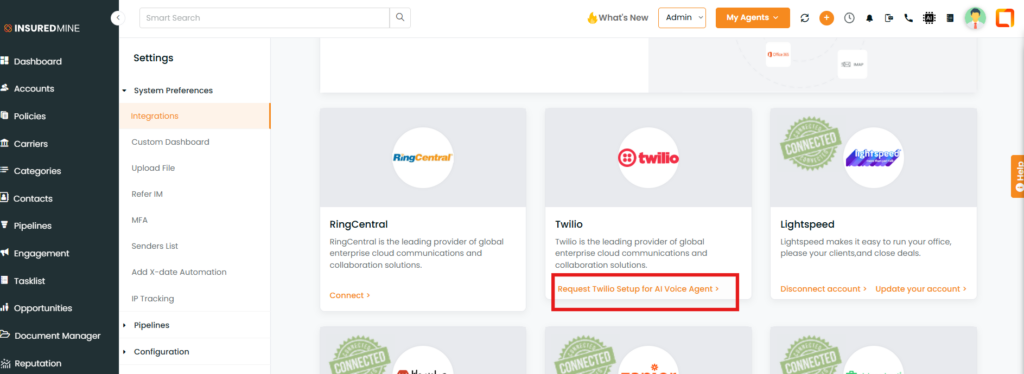
- Navigate to Settings → Integrations.
- Click Request Twilio Setup for AI Voice Agent.
- Enter your preferred area code in the dialoge box.
- Click Submit.
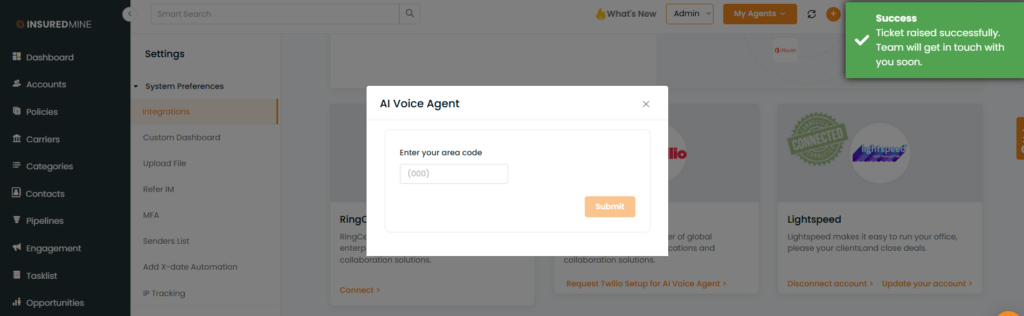
After submission, a confirmation message will appear: “Your ticket has been submitted successfully.”
Note – The request will be forwarded to support@insuredmine.com. The InsuredMine Support Team will configure a Twilio number within 24 business hours using the requested area code (subject to availability).
What Happens Next?
- The InsuredMine team will provision and configure a Twilio number for your account.
- The Twilio number will be used exclusively for AI Voice Agent calls.
- Your existing telephony provider will continue to handle regular calling and SMS without interruption.
- Once configured, the AI Voice Agent can place and receive calls using the assigned Twilio number.
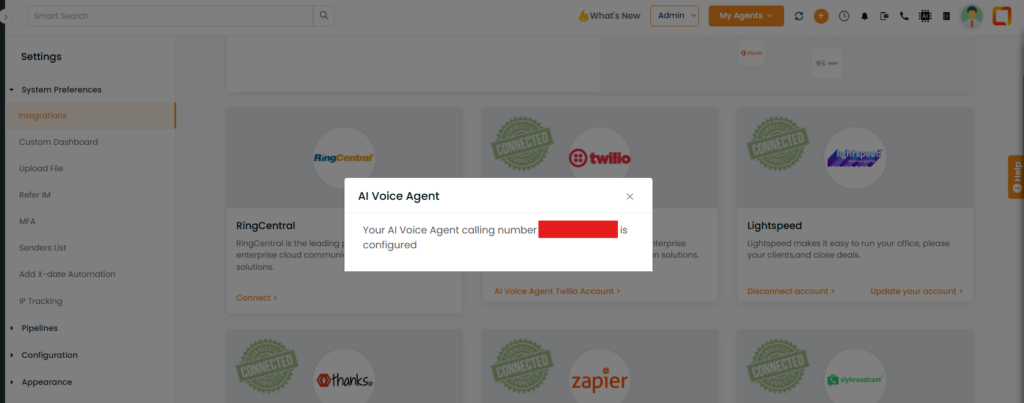
Note: Users may also be able to view the configured number on their setup page. This is how it will look after successful configuration.
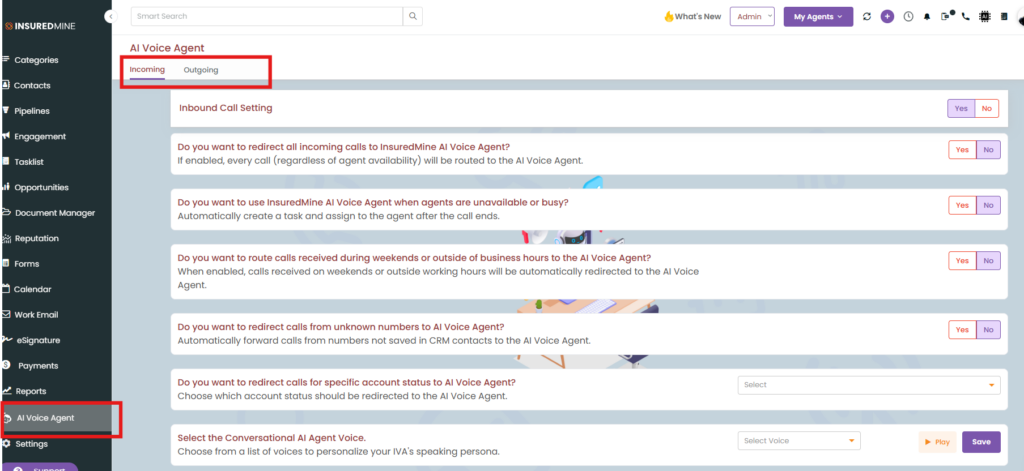
- Once the Twilio number is configured, users will gain access to the AI Voice Agent module from the left-hand navigation menu. Within this module, Admins can configure and manage both Inbound and Outbound AI Voice Agents.
How It Works
Primary Telephony Provider
Your existing provider continues to handle:
- Manual outbound calls
- Inbound calls
- SMS communications
Twilio (AI Voice Provider)
The Twilio number is dedicated to:
- AI outbound calls
- Automated AI Voice conversations
Note: SMS functionality remains with your primary telephony provider.
AI Call Flow
- A user or automation initiates an AI Voice call.
- InsuredMine validates that the AI Voice Agent is enabled and that a Twilio number is configured.
- The call is initiated through Twilio.
- The AI Voice Agent manages the conversation.
- The interaction is logged and tagged as an AI Voice call.
Tracking AI Voice Calls
AI Voice interactions are available throughout InsuredMine and can be viewed in:
- AI Voice agent separate Dashboard
- Pipeline Card Activity Timeline
- Communication Logs – AI voice agent calls will be flagged.
FAQs
Will AI Voice Agent replace my existing phone provider?
No. Your existing provider continues to handle regular calling and SMS communications.
Can I continue using RingCentral or Nextiva?
Yes. AI Voice Agent works alongside your existing telephony provider without requiring any changes to your current setup.
Can the AI Voice number send SMS messages?
No. The Twilio number is used exclusively for AI Voice Agent calling. SMS functionality remains with your primary telephony provider.
Where can I view AI Voice interactions?
AI Voice interactions can be viewed in the AI Voice agent calling Dashboard and Communication Logs.
How are AI Voice calls identified?
AI Voice calls are automatically tagged and displayed separately from regular calls, making them easy to identify, filter, and report on.


