


Release Date: 09/11/2026
Overview
We have released a new enhancement in the Master Report that allows users to filter report data based on Servicing Roles.
With this enhancement, users can select a Servicing Role and the relevant employee while adding filters to the Master Report. Users can also add multiple Servicing Role filters to view data associated with different servicing roles.
The filtered Servicing Role information will also be included in the downloaded Excel report as a separate column.
Prerequisites
- User should have access to the Pipeline Dashboard.
- User should have access to the Master Report.
- Servicing Roles should be configured and available in the system.
How to Use Servicing Role Filter
Go to Pipeline Dashboard → Master Report.
1. Click + Add Filter.
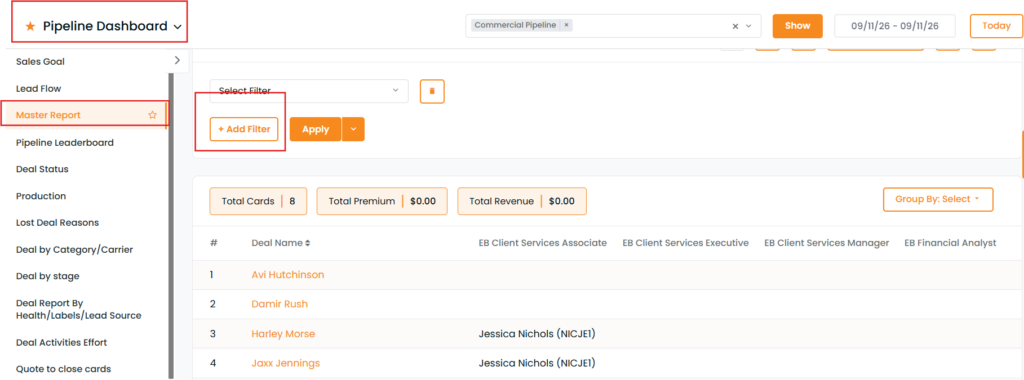
2. Select Servicing Roles from the filter dropdown.
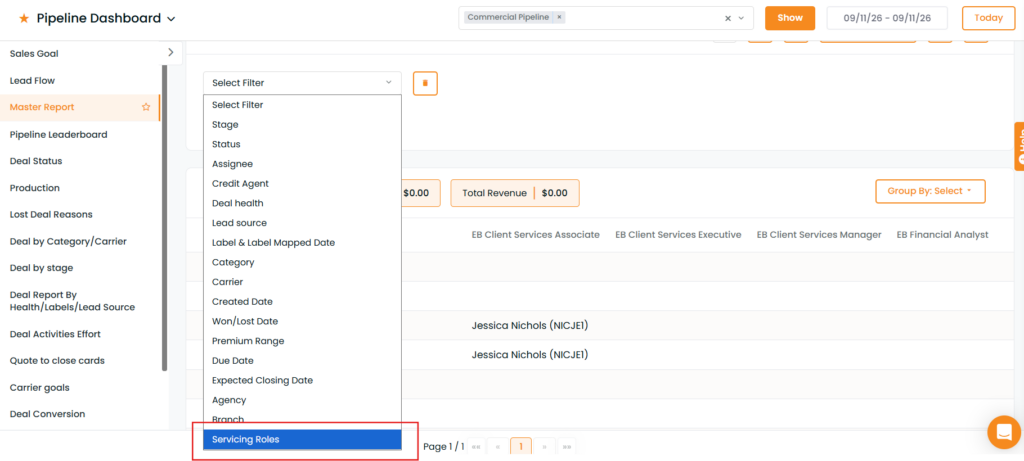
3. Select the required Servicing Role.
4. Select the relevant Employee.

5. To add another Servicing Role, click + Add Filter again.
6. Select Servicing Roles and select the additional Servicing Role and Employee.
Users can repeat the same process to add multiple Servicing Roles as required.
7. Click Apply.
8. The Master Report will display the data based on the selected Servicing Role(s), Employee(s), and other applied filters.
Downloaded Excel Report
When the filtered Master Report is downloaded in Excel format, the Servicing Role information will also be included as a column in the downloaded report.
This allows users to identify the Servicing Role associated with each record directly from the downloaded report.
Benefit
The Servicing Role Filter makes it easier to:
- Filter Master Report data based on Servicing Roles.
- Select the relevant employee associated with a Servicing Role.
- Apply multiple Servicing Role filters.
- Combine Servicing Role filters with other available Master Report filters.
- Quickly review role-specific pipeline data.
- Identify Servicing Roles in the downloaded Excel report.


