


Release Date: July 23, 2026
Availability
This enhancement is available to all users. The default sender email preference is configured at the user level, allowing each user to choose their own default sender email address.
Overview
Previously, automation emails were sent using the first verified email address available in the Sender List. As a result, users had to archive or rearrange their verified email addresses to control which email address was used for automated communications.
With this enhancement, users can now explicitly designate a default sender email address from their list of verified sender emails. Once selected, all automation emails initiated by that user will be sent using the chosen default sender email, eliminating the dependency on the order of verified email addresses.
Use Case: Many users maintain multiple verified sender email addresses for different purposes, such as personal communication, department-specific emails, or branch-level communications. Previously, changing the sender email for automation required managing the order of verified email addresses, which was inconvenient and could lead to unintended sender selections.
The new Make Default option allows users to easily select their preferred sender email, ensuring that automation emails are consistently sent from the intended email address without modifying the sender list.
Set a Default Sender Email Address
- Navigate to Settings.
- Under System Preferences, select Senders List.
- Review the list of your verified sender email addresses.
- Locate the email address you want to use as the default sender.
- Enable the Make Default toggle for that email address.
- A success message will appear confirming that the default sender email has been updated.
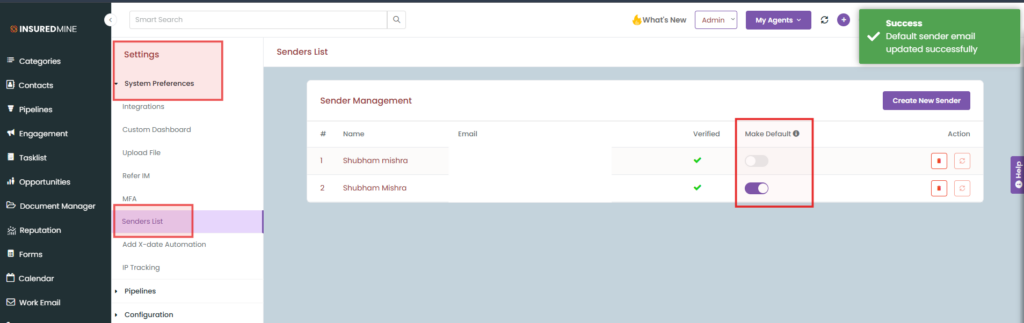
- After the default sender is selected, all automation emails initiated by that user will use the designated email address by default.
- Screenshot Placeholder: Senders List → Make Default toggle
Notes
- Only verified sender email addresses can be designated as the default sender.
- Each user can have one default sender email address at a time.
- Changing the default sender updates the email address used for future automation communications only.
- This setting is maintained per user and does not impact other users within the agency.


