


Release Date: 10/23/2026
Overview
The AI Voice Agent module has been enhanced to provide a more natural and confident voice experience and improve the follow-up process after outgoing calls.
With these enhancements:
- The updated voice model delivers more human-like, confident conversations that sound less robotic.
- Outgoing AI Voice Agent calls automatically create a note on the associated contact.
- A task is automatically created for the outgoing call and assigned to the Outgoing Voice Agent task type.
These updates extend the post-call documentation and task-creation workflow to outgoing calls, similar to the functionality available for incoming calls.
Prerequisites
- The outgoing AI Voice Agent should be configured for the intended calling workflow.
- The call should be placed through the AI Voice Agent.
Use Cases
- More natural conversations: Provide a more human-like and confident voice experience during outgoing calls.
- Automatic contact documentation: Record a note on the associated contact after an outgoing AI Voice Agent call.
- Task tracking: Automatically create a task for an outgoing call without requiring the user to create it manually.
- Task identification: Use the dedicated Outgoing Voice Agent task type to identify and filter tasks created through outgoing AI Voice Agent calls.
Navigation
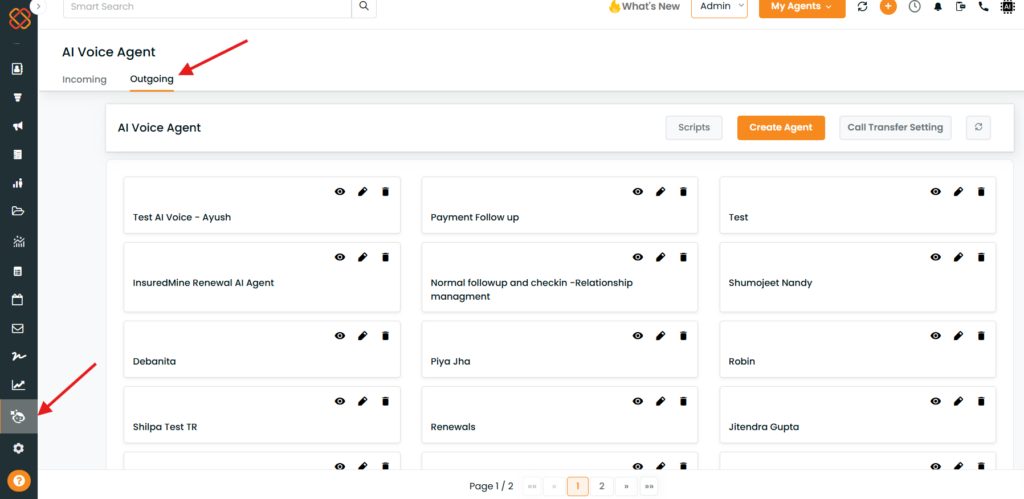
- Log in to InsuredMine.
- Open AI Voice Agent from the navigation menu.
- Select Outgoing.
- The outgoing-call configuration screen will be displayed.
Understanding the Enhancements
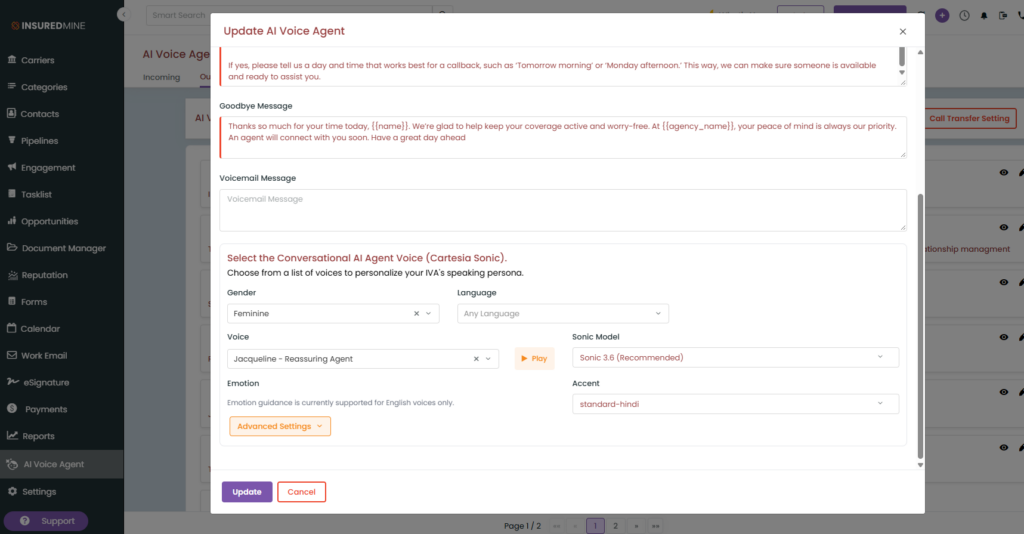
Step 1: Updated voice experience
The AI Voice Agent now uses an enhanced voice model designed to make conversations sound more natural and confident.
The updated voice experience is intended to reduce the robotic quality of AI-generated speech.
Step 2: Place an outgoing AI Voice Agent call
Use the existing outgoing AI Voice Agent workflow to initiate a call.
The automatic note and task creation behavior applies when an outgoing call is placed through the Voice Agent.
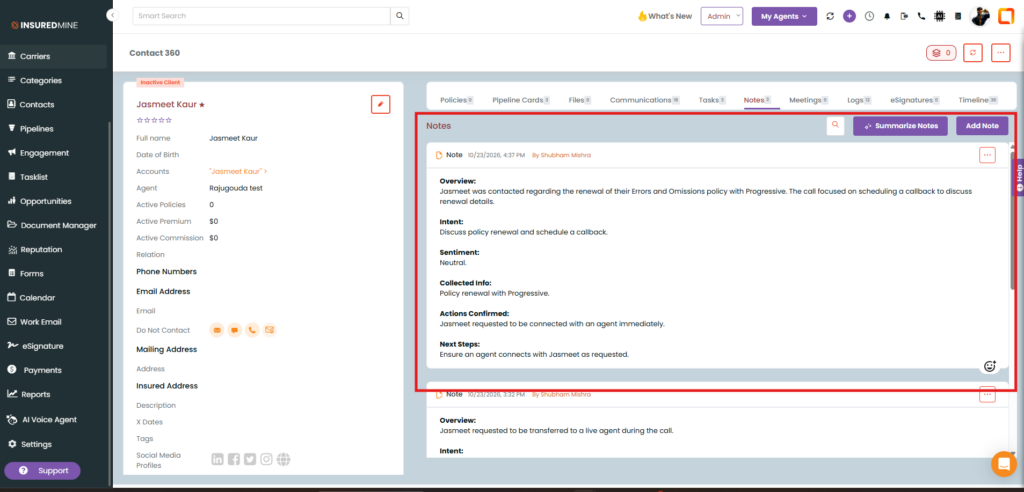
Step 3: Automatic note creation
After an outgoing AI Voice Agent call is placed, the system automatically adds a note to the associated contact.
This helps maintain a record of the outgoing calling activity within the contact’s information.
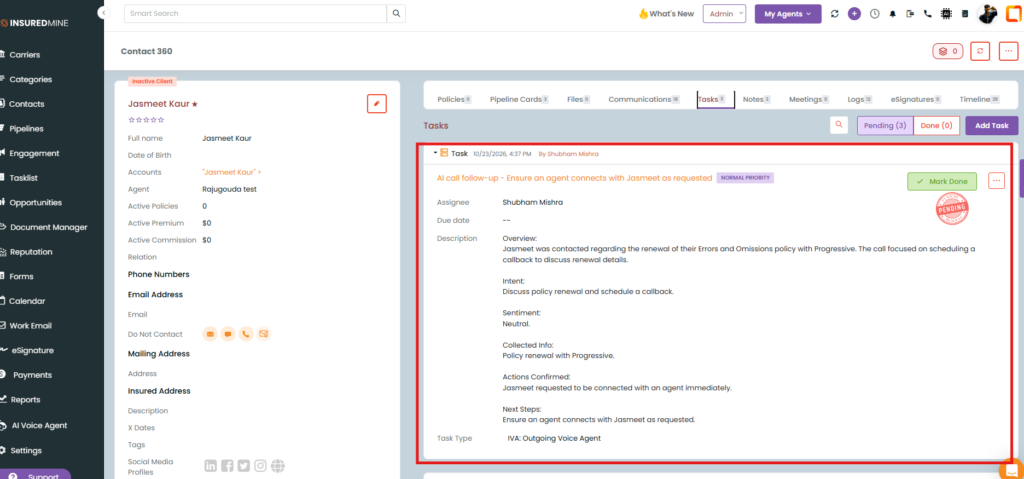
Step 4: Automatic task creation
The system also automatically creates a task associated with the outgoing AI Voice Agent call.
The task is assigned to the Outgoing Voice Agent task type.
This allows outgoing-call tasks to be identified separately from incoming-call tasks.
Step 5: Find outgoing-call tasks using filters
Users can identify outgoing AI Voice Agent tasks through the task filters.
- Open the task filtering options.
- Locate the task type filter.
- Select Outgoing Voice Agent.
- Review the tasks matching the selected filter.
Important Notes
- Enhanced voice model: The updated voice model is designed to sound more human-like and confident.
- Automatic notes: Outgoing AI Voice Agent calls automatically generate a note on the associated contact.
- Automatic tasks: A task is automatically created for outgoing calls.
- Task assignment: The task is assigned to the Outgoing Voice Agent task type.
- Separate task identification: The Outgoing Voice Agent task type allows users to distinguish outgoing-call tasks using filters.
- Existing functionality: These enhancements bring outgoing-call documentation and task creation in line with the corresponding functionality available for incoming calls.
- Configuration details: The meeting did not establish whether any additional configuration is needed to enable these enhancements. Do not assume a separate activation step is required.


