


Overview
InsuredMine’s AI Voice Agent supports Incoming and Outgoing call management.
IVA Incoming allows admins to configure how incoming calls are handled when agents are busy, unavailable, outside working hours, on weekends, or when specific call conditions are met.
Admins can control when calls are routed to AI and review call summaries, outcomes, callback requests, and follow-up tasks.
Prerequisites
- Administrator access to InsuredMine.
- AI Voice Agent enabled.
- Twilio connected and configured.
- Calling functionality enabled.
- Supported telephony setup configured.
- AI Voice Agent enabled for applicable inbound/outbound call configuration.
Use Case
Incoming calls may arrive when agents are busy, outside business hours, during weekends, or from unknown numbers.
The Incoming AI Voice Agent can automatically handle such calls based on configured conditions.
Examples:
- Agent is busy, and they disconnect or don’t answer the call → AI answers the call.
- Call arrives after working hours → AI handles the call.
- Unknown number calls → AI answers the call.
- Call matches a selected account status → AI handles the call.
Configure Incoming AI Voice Agent
Navigation
- Log in to InsuredMine.
- Go to AI Voice Agent from the left navigation.
- Select Incoming.
- Click Incoming Voice Agent Configuration in the top-right.
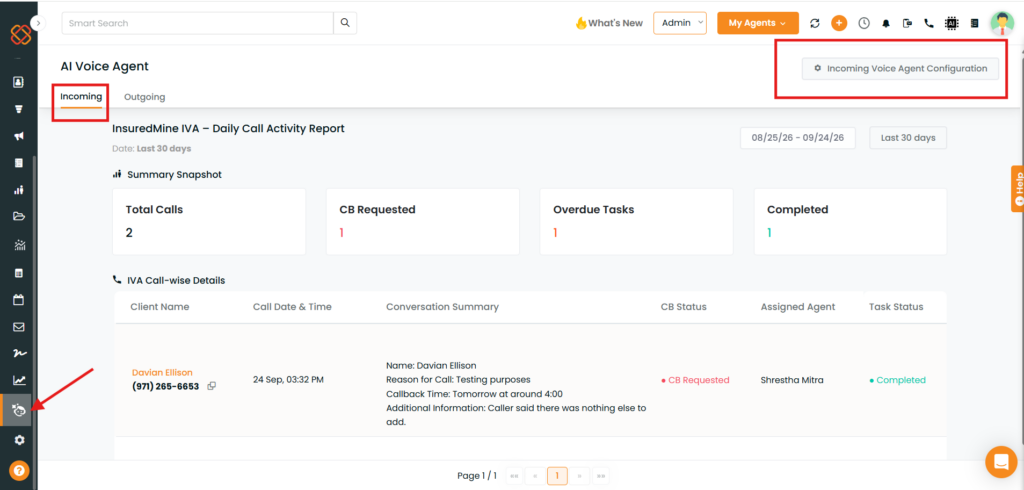
Note: Incoming Voice Agent configuration is available to admins.
Incoming Call Routing Settings
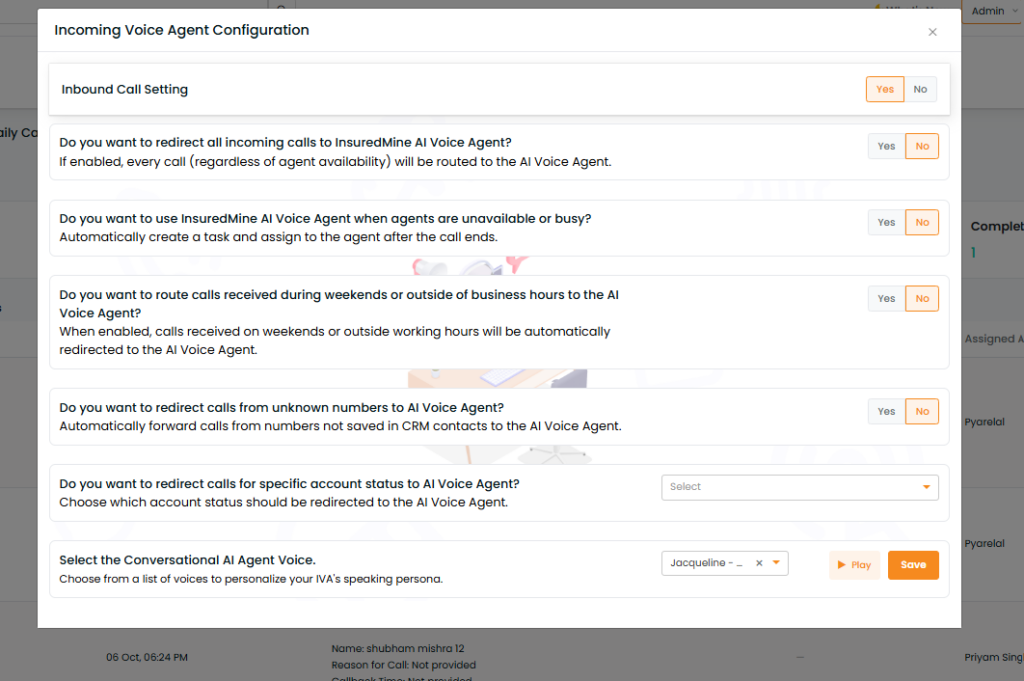
Admins can configure when incoming calls should be routed to the AI Voice Agent. Enable Yes for the conditions where IVA should handle the call.
Agent Busy or Unavailable
Routes the incoming call to IVA when the intended agent is busy or unavailable. If the agent disconnects the incoming call or doesn’t answer.
Weekend Calls
Routes incoming calls to IVA when calls are received on weekends.
Unknown Numbers
Routes calls to IVA when the incoming number does not match an existing InsuredMine contact.
Account Status
Routes calls to IVA based on the caller’s associated account status. Select the required status and enable Yes for the statuses that should be handled by IVA.
Available statuses depend on the agency configuration and may include Active Client, Inactive Client, Prospect, and Lead.
Select the AI Voice
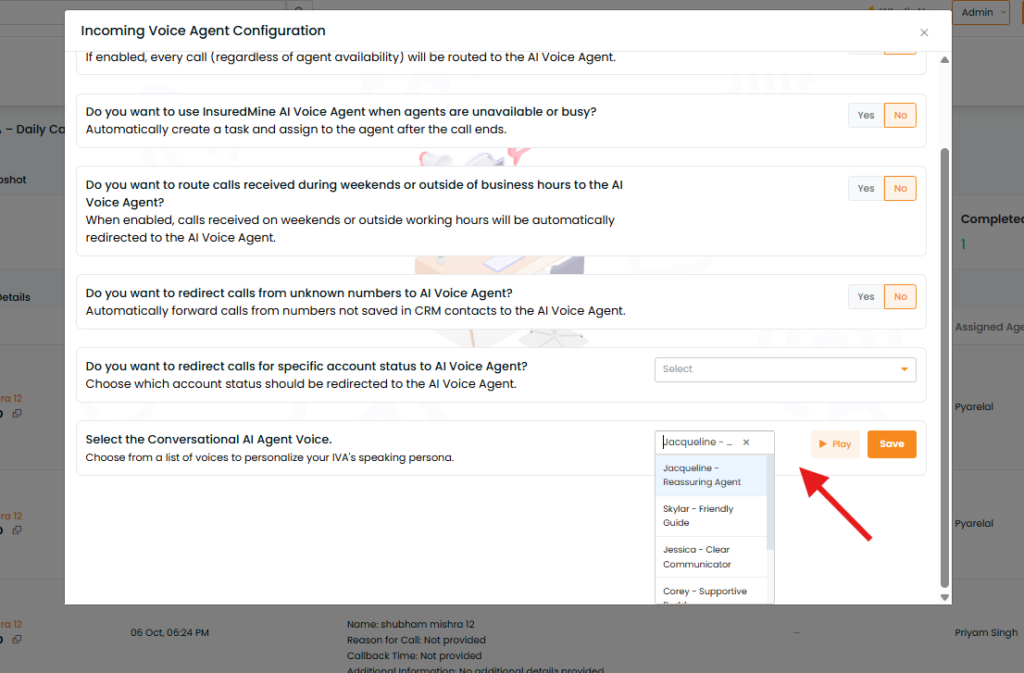
Admins can select the conversational voice used by IVA for incoming calls.
- Locate and select the Conversational AI Agent Voice.
- Click Select Voice.
- Use Play to preview the available voices.
- Select the preferred voice.
- Save the configuration.
The selected voice is used when IVA handles incoming calls.
llamcorper mattis, pulvinar dapibus leo.
What Happens During an Incoming IVA Call?
When an incoming call meets the configured routing conditions, IVA answers the call and interacts with the caller.
Depending on the conversation, IVA can capture information such as:
- Reason for the call
- Caller requirements or questions
- Callback request
- Relevant conversation details
After the call is completed, the conversation information can be available through the IVA call records and the associated contact’s communication history.
Callback Requests and Follow-Up Tasks
If the caller requests a callback, the call can be identified as a Callback Requested call. A follow-up task can be created for the assigned agent so the request can be handled.
The task information can include:
- Assigned agent
- Task status
- Due date
- Callback/follow-up requirement
Task statuses may include Pending, Completed, or Overdue.
Managing Overdue Tasks
If a callback task becomes overdue:
- Open the IVA Incoming Dashboard.
- Locate the relevant call.
- Select the associated Overdue task.
- Open the task.
- Complete the required action.
- Mark the task as Done.
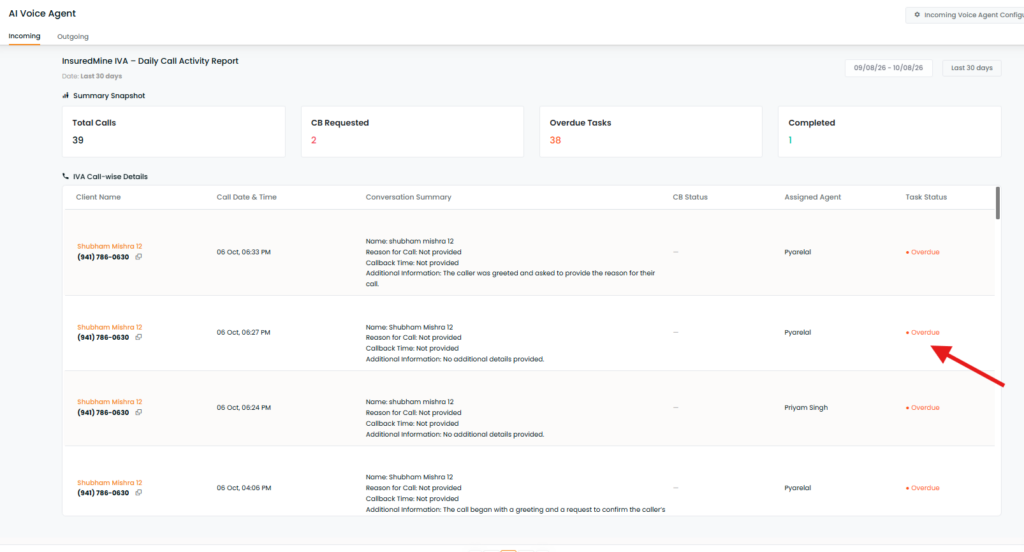
Users may also navigate to Tasklist and select the task type as “IVA: Incoming Voice Agent,” and all tasks created by IVA will be listed for review.
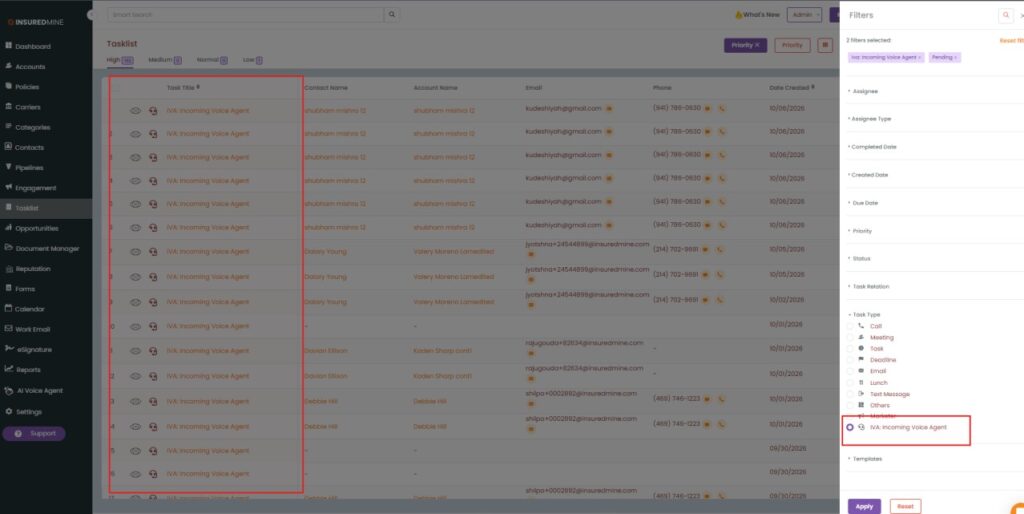
IVA Incoming Dashboard
Dashboard counts are calculated based on the selected period. For example, if Total Calls = 5, the dashboard is showing five IVA calls recorded within the selected date range.
Available options may include predefined periods such as Last 30 Days or a custom date range.
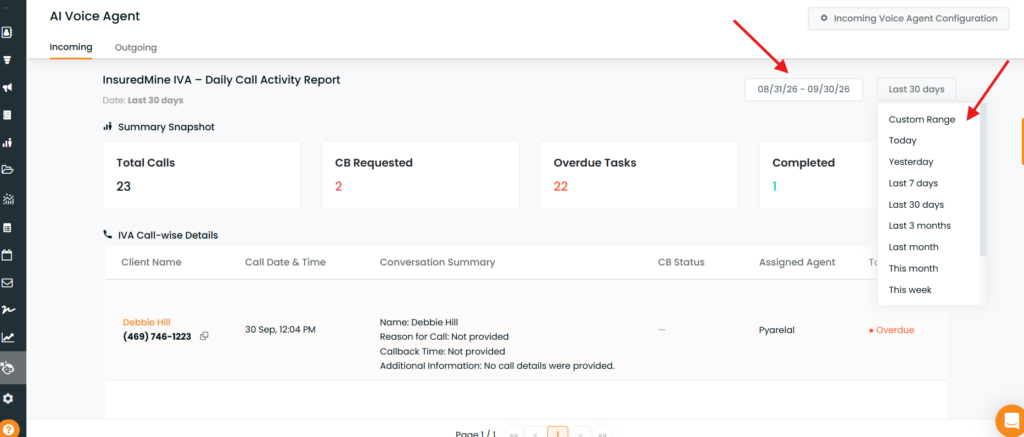
Dashboard Summary
The dashboard provides key metrics such as:
- Total Calls: Number of incoming calls handled by IVA during the selected period.
- CB Requested: Number of calls where the caller requested a callback.
- Overdue Tasks: Callback/follow-up tasks that are past their due date.
- Completed: Callback/follow-up tasks that have been completed.
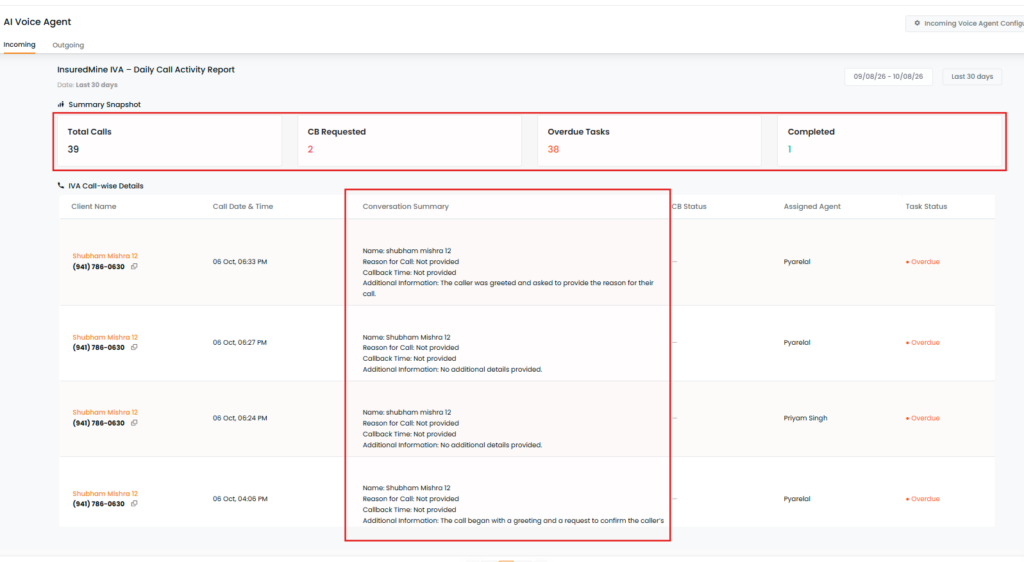
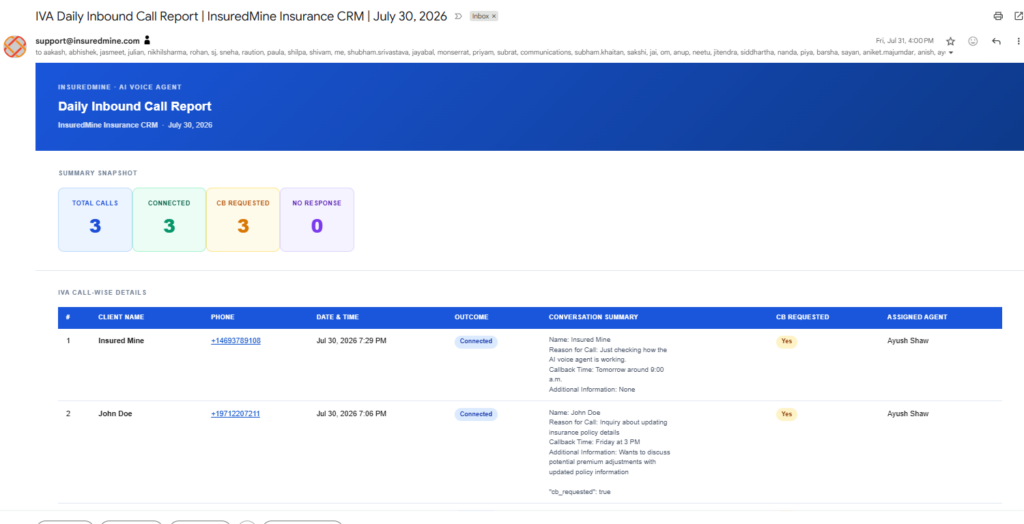
The Daily Call Activity Report — total calls, callback requests, and task status, with per-call client, summary, assigned agent, and task status.
Calling Dashboard
IVA calls are also available through the Calling Dashboard, where users can review call activity and related call information.
The Calling Dashboard can be used to review incoming/outgoing call activity and access available call details based on the user’s permissions and configured calling setup.
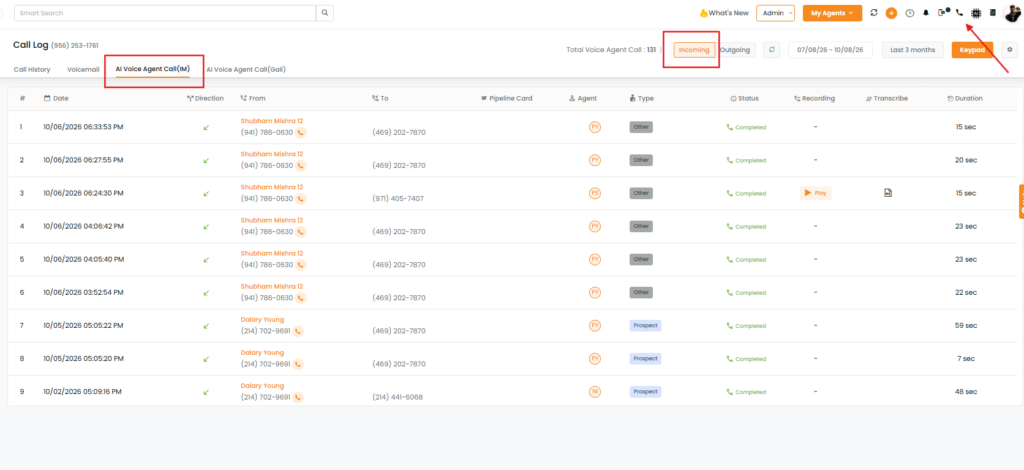
Note: The IVA Incoming Dashboard is focused on IVA-specific metrics and callback/task tracking, while the Calling Dashboard provides broader calling activity.
IVA Call Log:
Steps to View Call Details in Contact 360
- Navigate to the Calling Dashboard or Voice Agent – Incoming dashboard.
- Locate the required contact in the call details section.
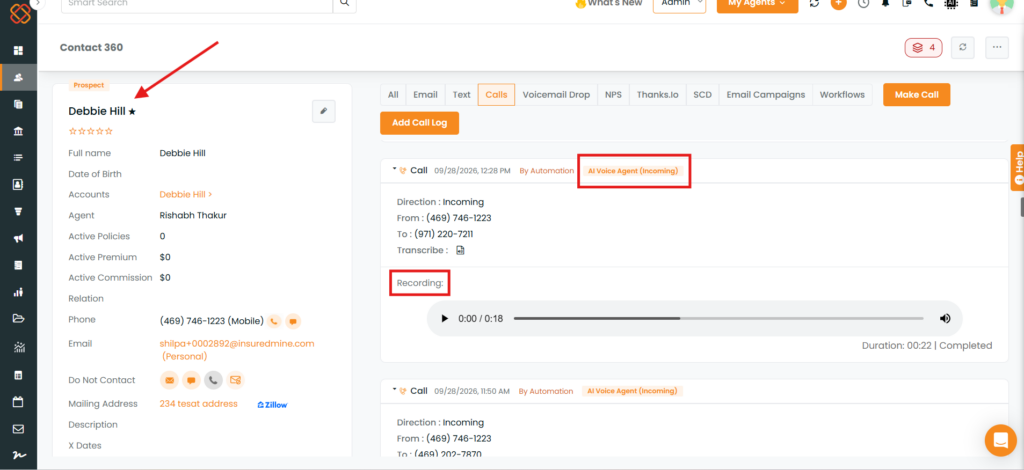
- Click the contact’s name to open the corresponding Contact 360 profile.
- Navigate to the Communication tab.
- Select Calls to view the available call details, including the conversation summary, calling number, recording, and other related communication information.
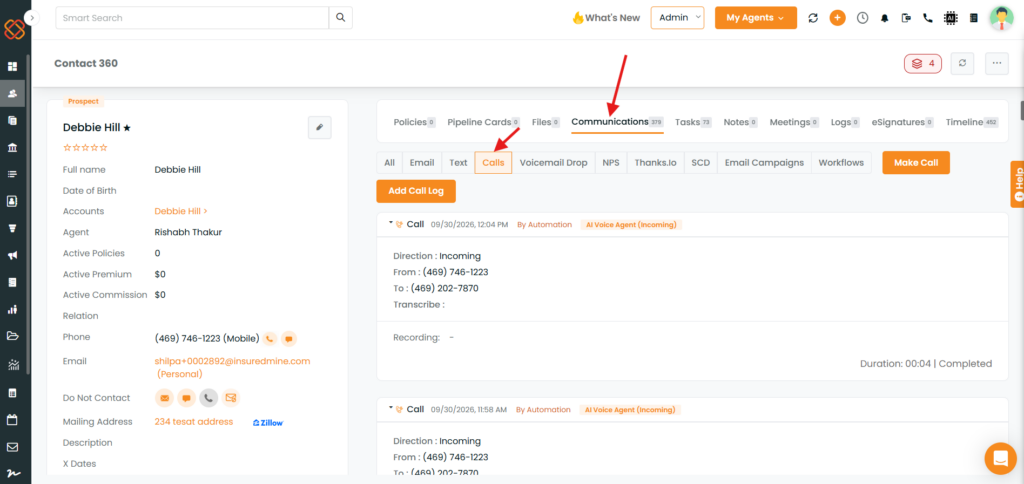
6. To initiate a new call, click Make a Call.
7. To manually add a call, select Add Call Log and enter the relevant details.
Admin Reports and Notifications
IVA-related information can also be shared with administrators through configured reports or notifications.
These may provide information such as:
- Incoming IVA call activity
- Callback requests
- Follow-up activity
- Task status
- Call-related details
Important Notes
- Incoming IVA routing is controlled through Inbound Call Settings.
- IVA handles calls only when the applicable routing condition is enabled.
- Dashboard metrics are based on the selected date range.
- Callback requests can create a follow-up task for the assigned agent.
- Call details and summaries are available in Contact 360.
- The IVA Incoming Dashboard provides IVA-specific activity, while the Calling Dashboard provides overall call activity.
- Report, task, recording, and call-detail availability depend on the configured setup.
- IVA requires a Twilio number. Users with LSV or RingCentral can request an additional Twilio number to use Incoming IVA.


