


Overview
The AI Voice Agent in InsuredMine (IM) enables agencies to make automated outgoing calls to clients and prospects. It can communicate using configured call scripts and AI voice settings, helping agencies streamline customer outreach, reminders, and follow-ups.
The AI Voice Agent also supports call forwarding. When a person requests to speak with an agent during a call, the call can be transferred to the phone number configured by the agency.
This article explains how to configure outgoing AI Voice Agent calls, set up call forwarding, and use the feature for different business scenarios.
Prerequisites
Before configuring Outgoing Calls, ensure that:
- A Twilio phone number is configured for AI Voice Agent functionality.
- The required call script and voice settings are configured.
- A valid destination phone number is available if call forwarding is required.
Important: If the agency does not have the required Twilio setup, the necessary configuration must be completed before using the AI Voice Agent.
Use Case
Outbound calls can take up a significant amount of an insurance team’s time, especially when the same type of follow-up needs to be made across multiple contacts.
AI Voice Agent can be used for scenarios such as:
- Following up with leads or prospects
- Customer follow-ups
- Renewal-related outreach
- Reminders
- Other predefined outbound communication
For example, an agency may have a group of customers that need a follow-up. Instead of an agent calling each customer individually, the AI Voice Agent can be configured to make those calls and handle the initial conversation.
Configuring Outgoing AI Voice Agent Calls:
- Log in to InsuredMine.
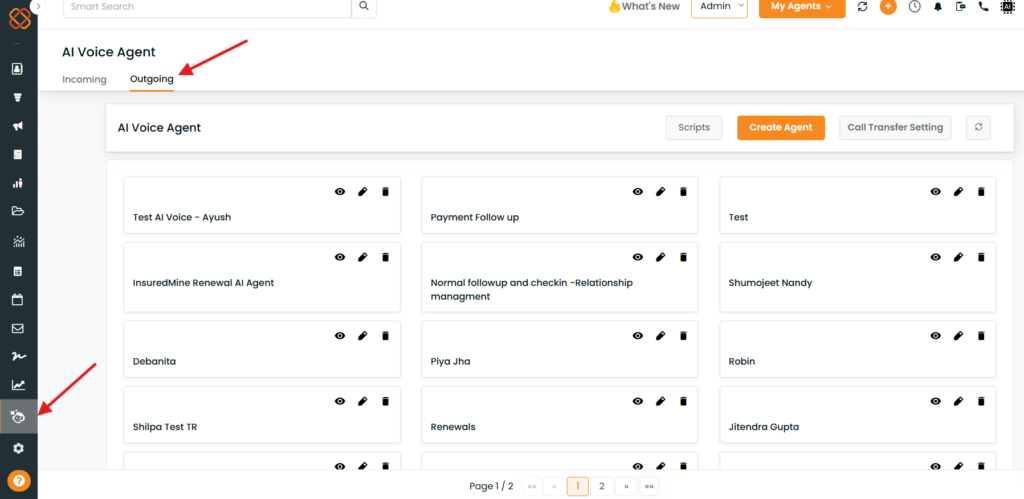
- Open AI Voice Agent from the navigation menu.
- Select Outgoing.
- The outgoing-call configuration screen will be displayed.
Configure the Call Script
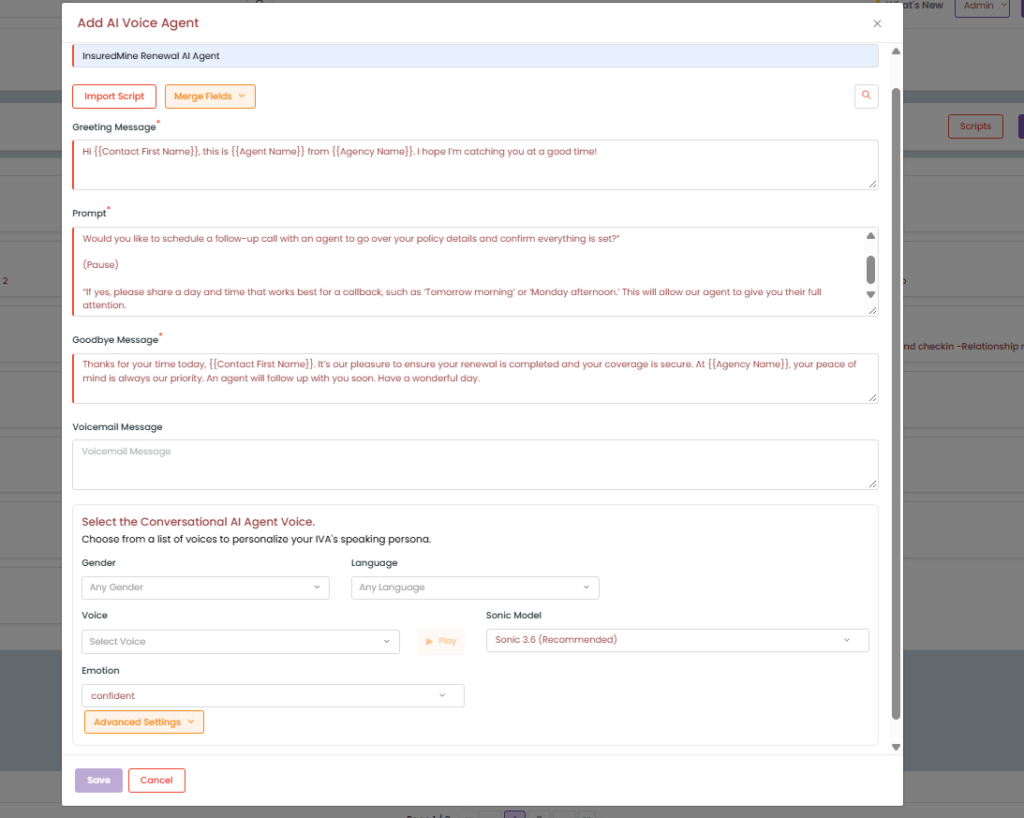
Configure the script that the AI Voice Agent will use during the outgoing call. The script should clearly define the purpose of the call and the information the AI Voice Agent needs to communicate.
- Click on Scripts or Create Agent

Either select from existing predefined scripts or add your own Message as per use case.
Configure Call Forwarding
InsuredMine supports call forwarding for outgoing AI Voice Agent conversations.
If a person requests to speak with a human agent during the call, the AI Voice Agent can transfer the call to the phone number configured by the agency.
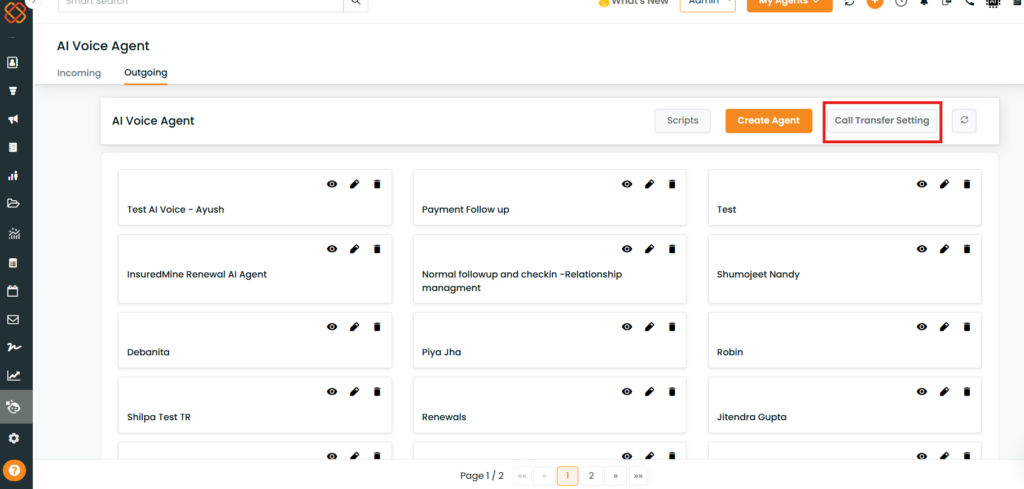
- Open the Call Transfer Settings section.
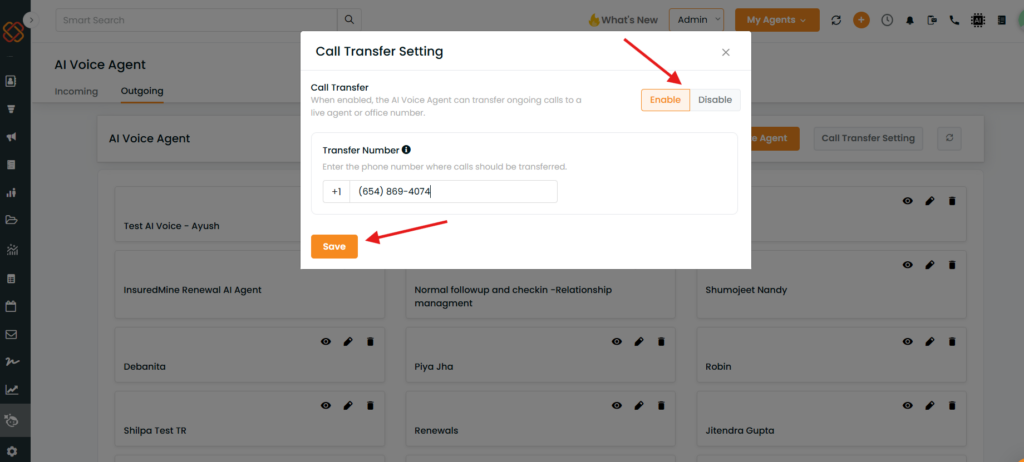
- Enable the outgoing-call enable/disable option.
- Type the number you want to make the calls from and save it.
Once enabled, the AI Voice Agent becomes available for the outbound calling activities configured for your account.
Example: During an outgoing call, the AI Voice Agent is discussing a policy renewal with a client. The client asks to speak with an agency representative. The AI Voice Agent can transfer the call to the configured forwarding number, allowing the client to continue the conversation with a human agent.
Quick Test – Initiating an AI Voice Call
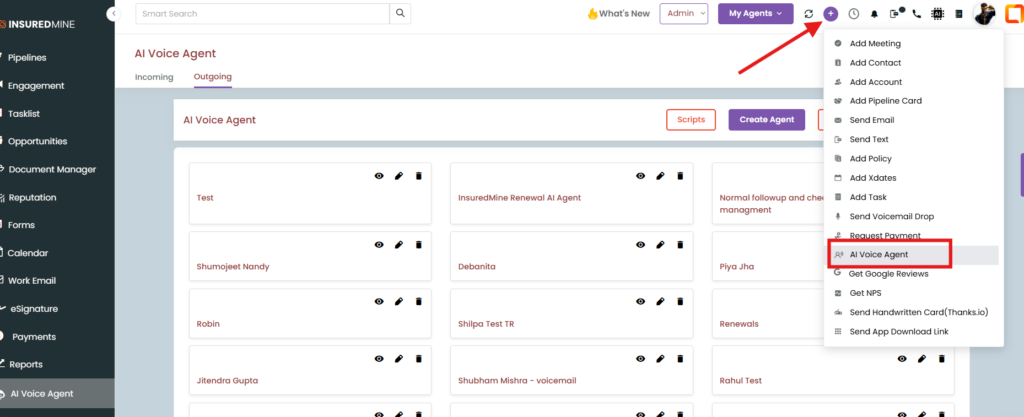
The “+” icon provides a quick way to initiate an AI Voice Agent call without setting up an automation.
Steps
- Click the “+” icon (Quick action) in the application.
- Select AI Voice Agent.
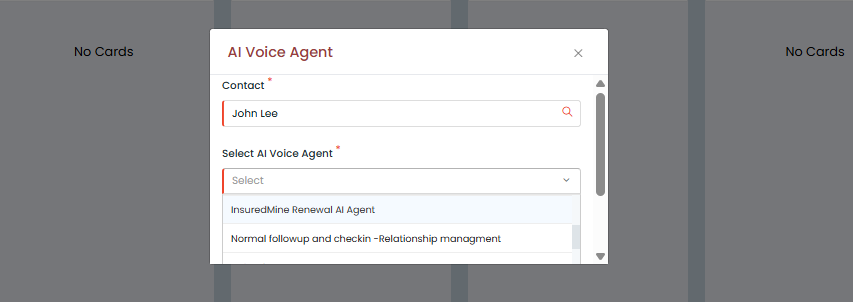
- Select the Contact you want the AI Voice Agent to call.
- Select the Script that should be used for the conversation.
- Initiate the call.
The AI Voice Agent will immediately trigger an outgoing call to the selected contact.
Reviewing AI Voice Agent Calls
After the call is completed, users can review the call details from the available calling and communication areas.
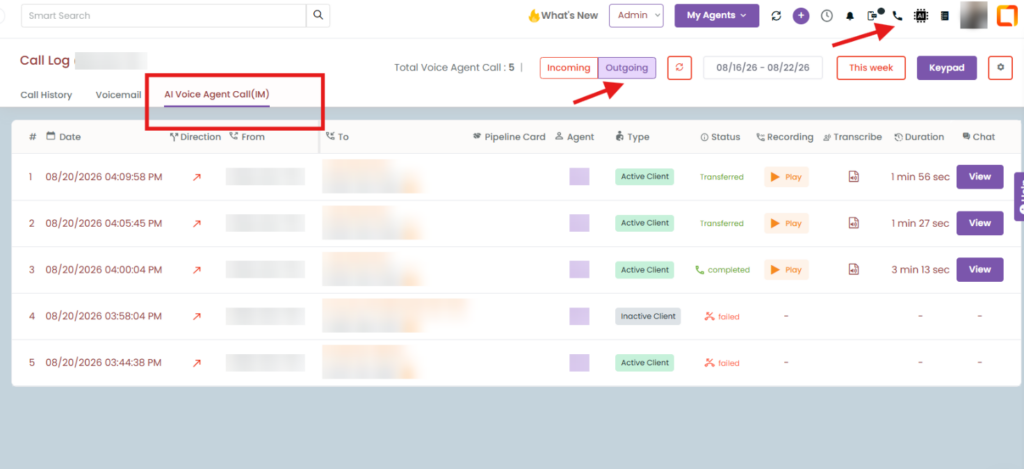
Calling Dashboard
The Calling Dashboard provides visibility into AI Voice Agent calling activity and analytics. Users can review information such as:
- Call activity
- Call status
- Call duration
- Call summaries
- Recordings
- Transcribes
Call Details in Communications
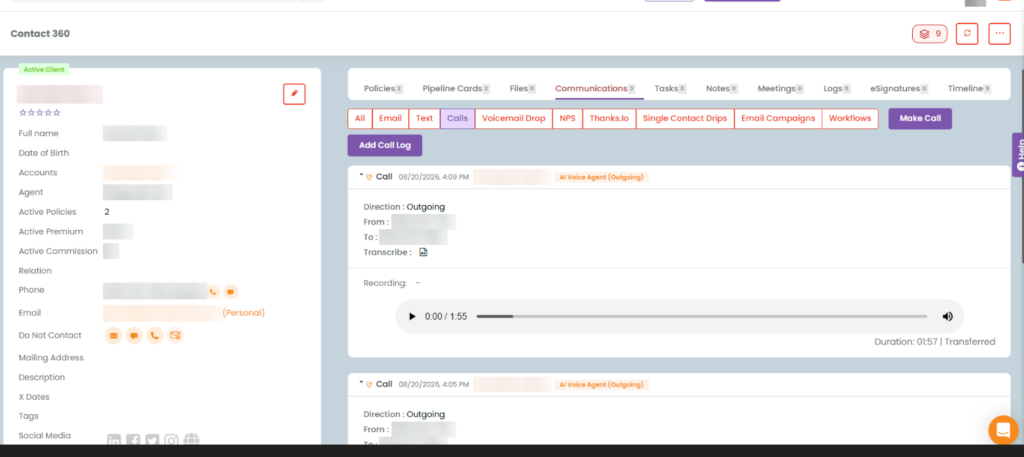
AI Voice Agent call activity is also available under Communications of the 360 profile. Users can use this area to review the communication history associated with the contact, including:
- Call details
- Call summary
- Recording
This provides a convenient way to review the AI Voice Agent interaction directly from the contact’s communication history.
Automatic Call Summaries and Follow-up Tasks
After every AI Voice Agent call, a Task and a note with a call summary will be added by default under the contact.
Additional AI Voice Agent Options
The quick-test functionality is intended for immediate testing and ad-hoc outbound calls. For production use cases, AI Voice Agent calls can also be incorporated into:
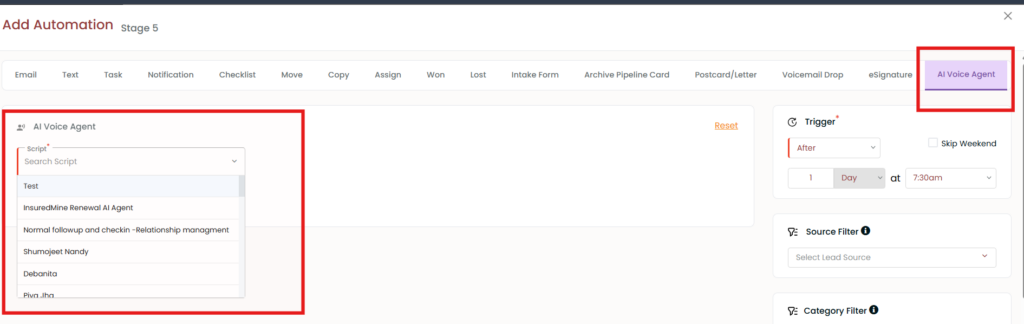
Pipeline Automation
AI Voice Agent calls can be triggered automatically based on configured pipeline events or conditions.
Workflow
AI Voice Agent can also be incorporated into workflows to automate outbound calling based on defined business conditions.
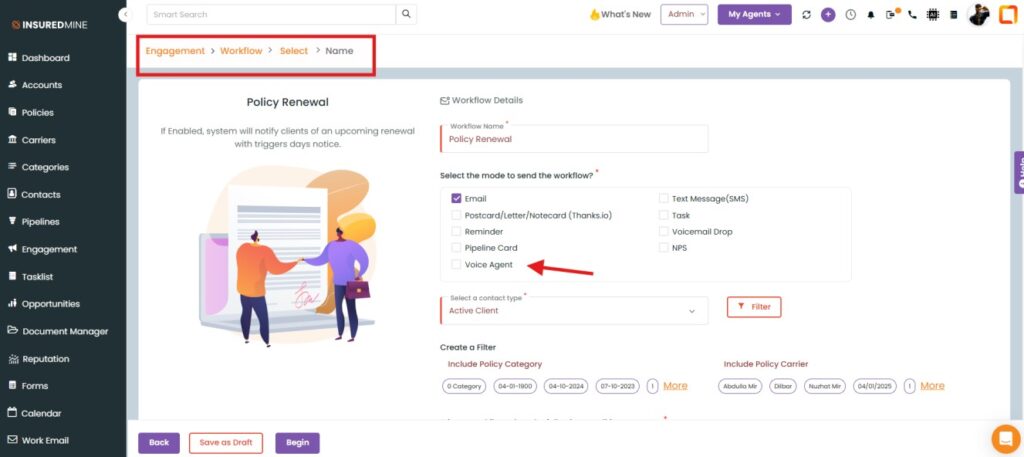
These options are recommended when the goal is to automate calling at scale rather than manually trigger individual test calls.
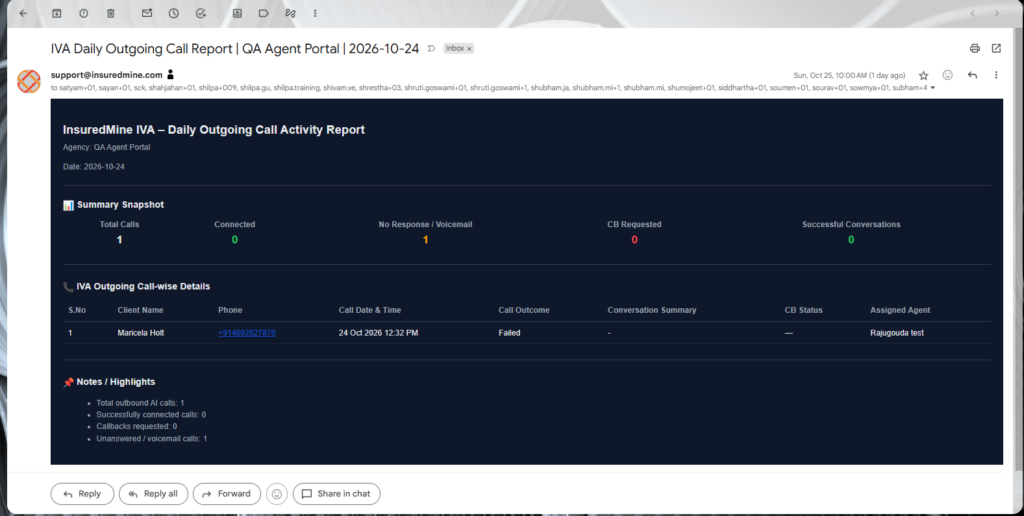
Admin Reports and Notifications
Outgoing Voice agent calls-related information can also be shared with administrators through email the following day.
Upcoming Enhancements
The following enhancements are planned or under development and may not be available in the current version.
AI Voice Agent Reporting for Outgoing calls (similar to incoming) – A dedicated reporting page is planned to provide agency users with better visibility into AI Voice Agent call activity and related details.
Configurable Email Reports – Additional reporting configuration options are planned to give agency administrators greater control over call report delivery and recipients.


