


Release Date: 09/25/2026
Available for: Admins, Managers, and Agents with access to the InsuredMine Outlook Add-in
Overview
The InsuredMine Outlook Add-in now supports Single Sign-On (SSO), allowing users to log in using their organization’s SSO credentials.
When SSO is enabled for the organization, users can access the InsuredMine Outlook Add-in without entering their InsuredMine username and password separately.
Use Case
Users can securely access InsuredMine directly from the Outlook Add-in using their existing organizational SSO credentials, making the login process faster and easier.
To Log in to the InsuredMine Outlook Add-in Using SSO
- Open Microsoft Outlook.
- Open the InsuredMine Outlook Add-in.
- On the login screen, select Log in with SSO.
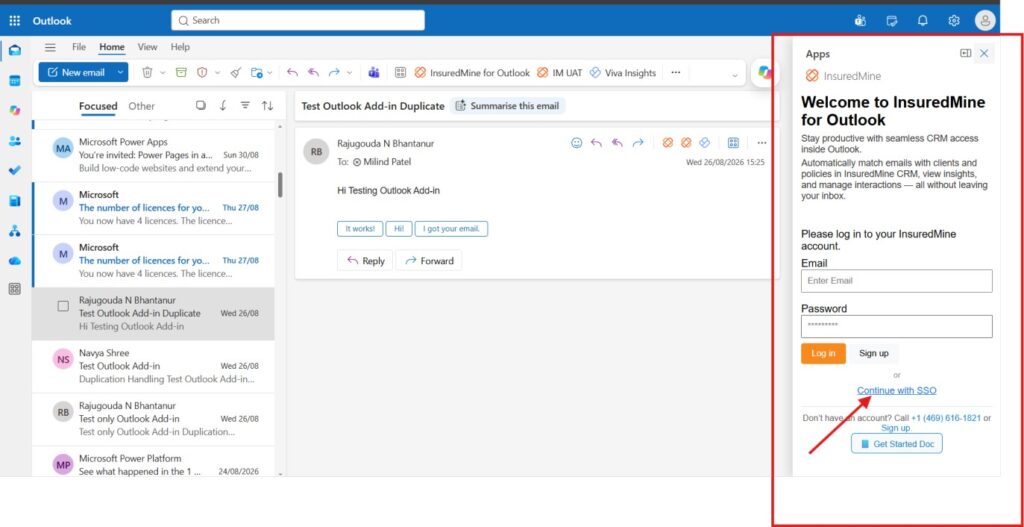
4. Enter your organizational credentials if prompted.
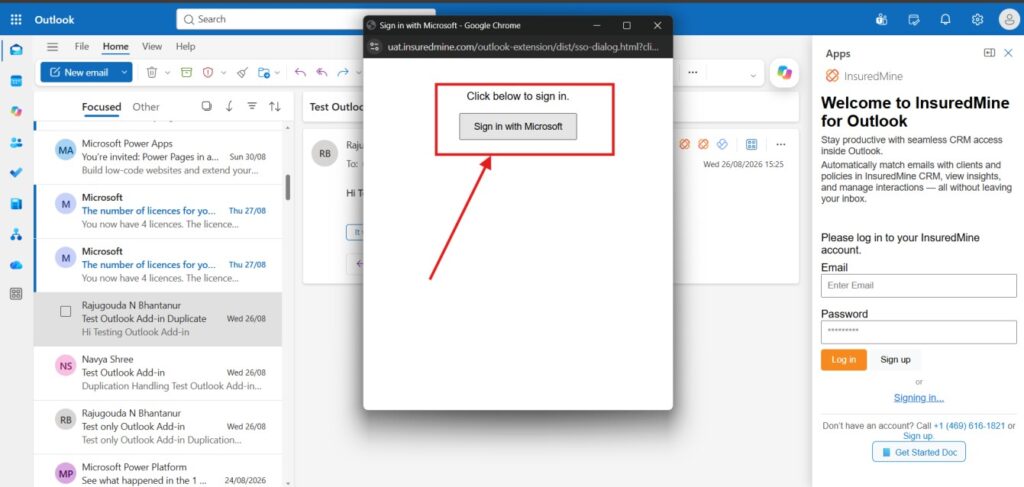
5. Complete the authentication process using your organizational credentials. This will configure SSO for your login.
6. Once authentication is successful, you will be logged in to the InsuredMine Outlook Add-in.
Note
- Your agency must have SSO configured for you to log in using SSO.
- SSO must be enabled for your organization to use this login option.


