


Release Date: 09/25/2026
Available for: Admins, Managers, and Agents with access to the InsuredMine Outlook Add-in
Overview
The InsuredMine Outlook Add-in now displays multiple Accounts/Contacts associated with the same email address.
Previously, if multiple Accounts or Contacts in InsuredMine shared the same email address, users could not easily identify which record they were working with in the Outlook Add-in. As a result, when adding a note, task, or performing another action, users might not know which Account/Contact the action was associated with.
With this enhancement, the Outlook Add-in displays all matching Accounts/Contacts, allowing users to select the correct record before performing an action.
Use Case
When multiple Accounts or Contacts share the same email address, users can identify and select the correct record before adding notes, creating tasks, or performing other actions through the Outlook Add-in.
This helps ensure that information is added to the intended Account/Contact.
To View and Select Matching Accounts and Contacts
- Open Outlook and launch the InsuredMine Add-in.
- Open an email associated with an email address.
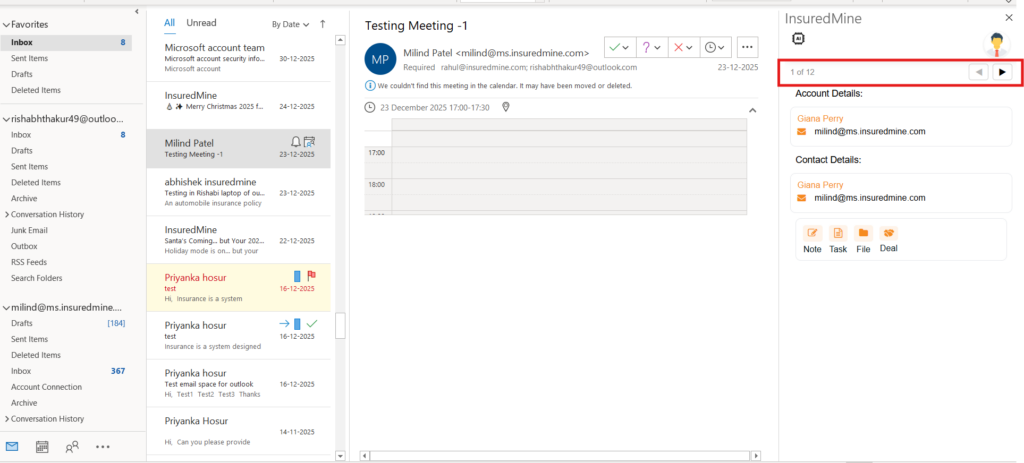
Here, you can see 12 accounts associated with the same email address, with the option to select and add data to the correct record.
3. View the list of matching Accounts/Contacts displayed in the Add-in.
4. Select the correct Account/Contact.
5. Perform the required action, such as adding a note, creating a task, or performing another supported action.
The action will be associated with the selected Account or Contact.


