


Release Date: 09/09/2026
This enhancement is available to Admins and Agents.
Overview
The Sort and Search enhancement improves how users interact with filters across multiple modules. Users can now search within a filter’s option list to quickly find the value they need, instead of scrolling through a long list. Additionally, all filter options are now sorted alphabetically (A-Z), making it easier to locate specific values.
This enhancement applies to filters in the following modules:
- Opportunities
- Accounts
- Contacts
- Policies
- Pipeline
- Tasklist
- Carrier
- Category
- Reports
Use Case: As an Admin or Agent, when they open Filters inside a module (e.g., Carrier, Accounts, Pipeline), they can search for a specific filter value using the search box and view all filter options sorted alphabetically, so they can quickly find and apply the value they need without scrolling through a long list.
Steps to Use the Sort and Search Filter
- Navigate to the module where you want to apply a filter (e.g., Accounts, Pipeline, Reports).
- Click on Filters.
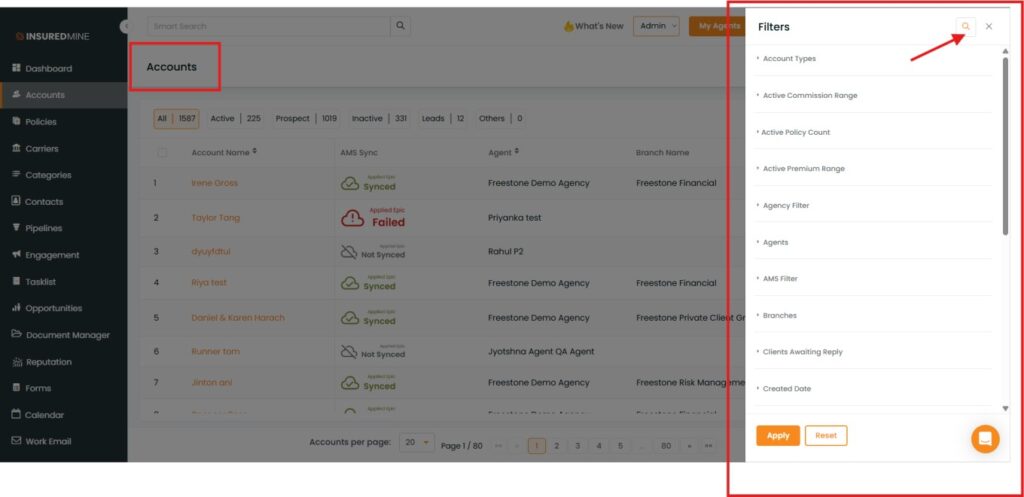
3. Select the filter field you want to use.
4. Use the Search box within the filter on top to type the value you are looking for.
5. The filter list will narrow down to matching results as you type.
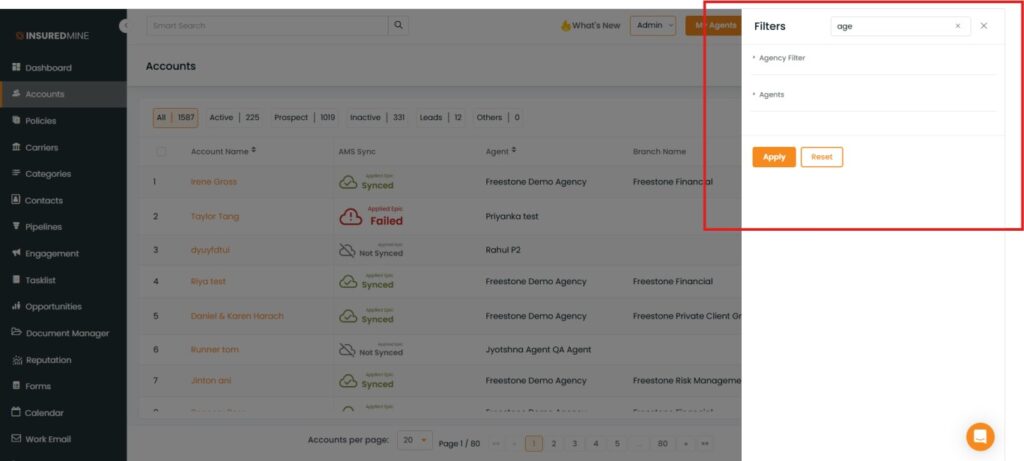
6. All available options in the filter list are displayed in alphabetical order by default.
7. Select the required value(s) from the filtered list.
8. Apply the filter.


