


Release Date: 23 July, 2026
Overview
The X-Date Workflow has been enhanced to provide greater flexibility and improve workflow accuracy.
Two key enhancements have been introduced:
- X-Date Source Selection: Users can now configure workflows to evaluate X-Dates from either the Contact or Account level.
- Policy Validation Before Triggering: Before executing an X-Date workflow, the system checks whether a policy of the same category already exists with an effective date within ±15 days of the X-Date. If a matching policy is found, the workflow will not trigger.
These enhancements help ensure that communications are sent to the appropriate recipients while preventing duplicate or unnecessary outreach.
Use Case: Many agencies store X-Date information at the Account level instead of the Contact level, especially for commercial accounts. The new X-Date Source option allows workflows to be configured based on where the X-Date information is maintained.
Additionally, validating existing policies before triggering a workflow helps avoid sending renewal or marketing communications to customers who have already purchased coverage for the same policy category.
Configure the X-Date Workflow
- Navigate to the engagement module.
- Under Automation, select Customize X-Date Automation or open an existing Custom Workflow.
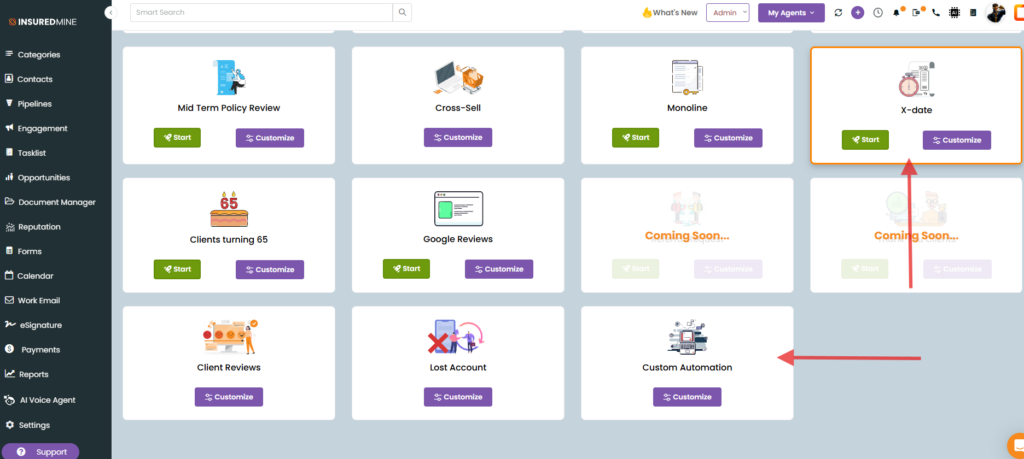
- Create a new workflow or edit an existing one.
- Select the X-Date Source:
- Contact
- Account
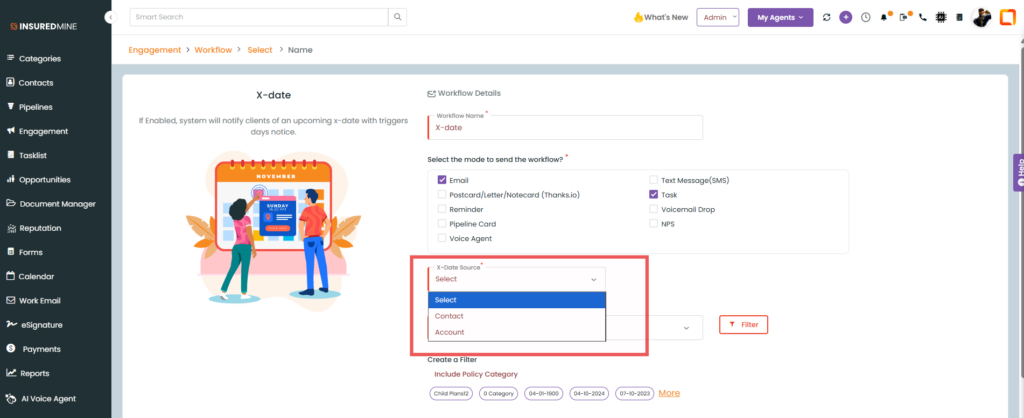
- Complete the remaining workflow configuration and save the workflow.
- When the workflow is evaluated:
- If Contact is selected, the system checks X-Dates and policies associated with the Contact.
- If the Account is selected, the system checks X-Dates and policies associated with the Account.
Before the workflow is triggered, the system validates whether a policy with the same category exists and has an effective date within ±15 days of the X-Date. If a matching policy is found, the workflow is skipped.
Notes
- Existing X-Date workflows will continue to use Contact as the default X-Date source.
- Policy validation is performed automatically before the workflow is triggered.
- A workflow is suppressed only when a policy with the same category exists, and its effective date falls within ±15 days of the configured X-Date.
- This enhancement helps reduce duplicate communications and improves the relevance of automated outreach.


